Yanhua ACDP-2 VW MQB Full Package 2025
Yanhua ACDP-2 VW MQB Full Package 2025 Description:
New Bundle Yanhua ACDP 2 MB TCU / ISM / DSM Package ( ACDP 2 Key Programming, Module 16, Module 18, Module 19, Module 36, Module 42 )
Key Programming Tools From YanhuaACDP with Product Number: MKON585
This Weight Product: 4000g
Yanhua ACDP-2 VW MQB Full Package 2025 Included:
- Yanhua Mini ACDP 2 Key Programming Master Basic Module
- Yanhua Mini ACDP MQB48 Key Programming Mileage Correction Module 33 with License A608 Support Add Key
- YanhuaACDP Module 34, VW MQB34
- YanhuaACDP VW MQB YH-OBD platform
- YanhuaACDP R7F701401/21-5D Interface Board for VW MQB 5D Mileage Correction
- YanhuaACDP R7F701402-B interface board for Module 34 Available in Volkswagen Polo
ACDP 1 vs ACDP 2:
ACDP 1: Wireless connection only
ACDP 2: Wireless and USB connection, connect ACDP host via Android, iOS and PC devices via USB without Bluetooth adapter.
ACDP-2 Basic Module features:
It supports 93/24/25/35/95 Series EEPROM in circuit programming (ICP) and on adapter board programming (OBP). This module is a necessary basic configuration for other modules.
Extended Functions: By expanding more adapters to achieve various functions such as ECU programming key programming/matching, ECU refresh.
The current adapters include: BMW CAS, BMW FEM/BDC, BMW DME, Meter/Instrument, BMW Key refresh, BMW FRM (Footwell), BMW EGS (Gearbox), Fujitsu CPU, VW MQB, Jaguar Land/Rover KVM, Porsche BCM, Volvo, etc.
Mini ACDP-2 Advantages:
1. No need removing chip, No need soldering, No need cutting line, No need lifting the pin.
2. USB direct connection, plug and play. Wi-Fi connection, wireless free.
3. Pin intelligent detection, Data reading and writing is safe and reliable.
How to Bind the second-generation ACDP:
1: Bind directly through the USB cable. The 3 USB cables correspond to Android, IOS, and PC respectively. After binding the device in this way, the USB cable must be connected to the host and the mobile phone, and it cannot be used without the USB cable. Disconnect the USB cable and the device will lose connection.
2: Configure Wi-Fi or hotspot binding through the USB cable. The binding process of this method requires a USB connection, and then enter the Wi-Fi or hotspot name and password to complete the binding. After binding, you can unplug the USB cable and use it wirelessly.
3: Configure Wi-Fi or hotspot binding through the Bluetooth of the mobile phone. This method is the same as the binding method of the 1st generation host. Wireless use after binding.
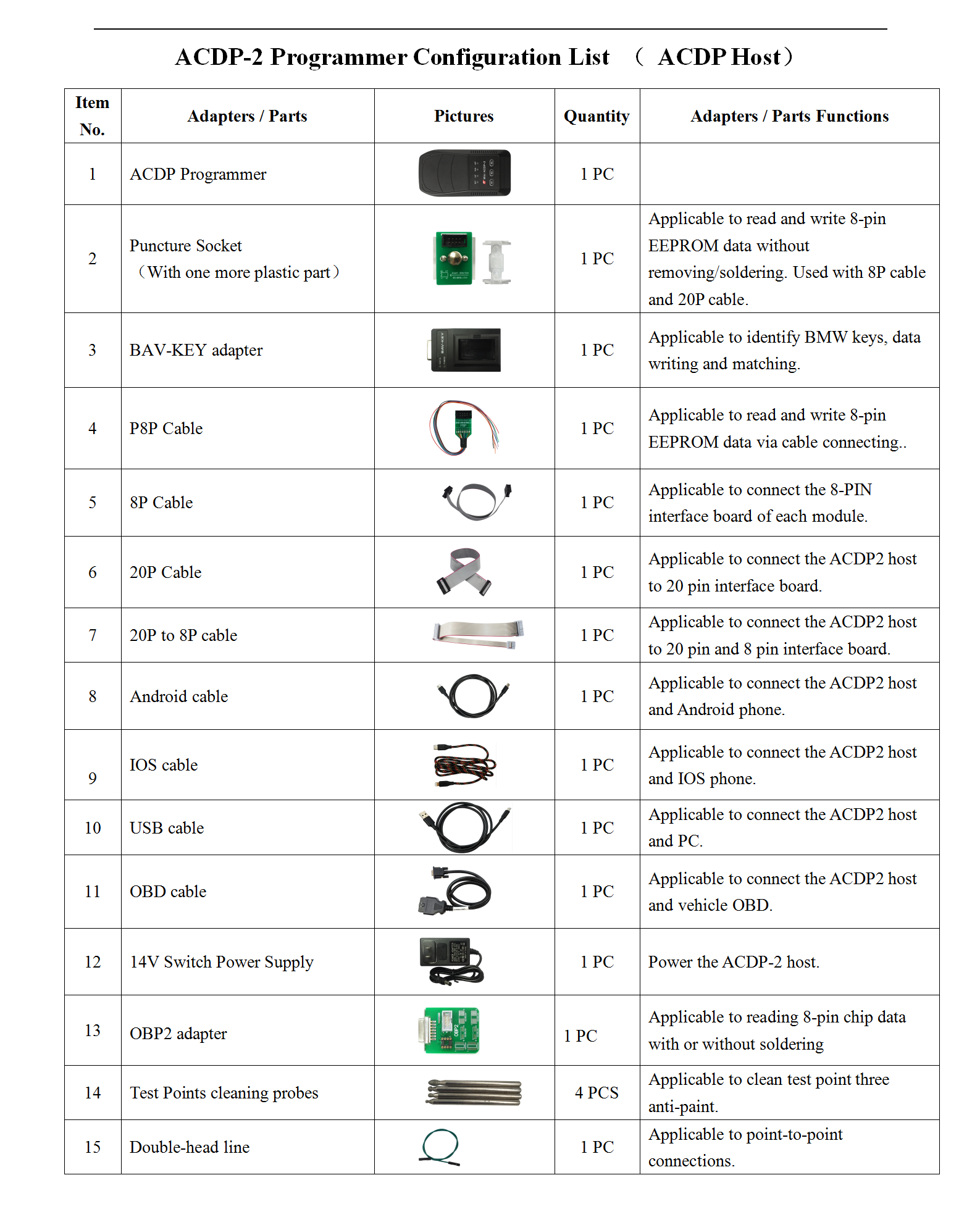
Yanhua Mini ACDP 2 Key Programming Master Basic Module Package List:
 EN
EN
 AR
AR
 DE
DE
 EL
EL
 ES
ES
 FR
FR
 IT
IT
 PT
PT
 RO
RO
 RU
RU
 TR
TR
 BG
BG